Digital marketing

How to Adapt AI Workflows in Your Digital Marketing Campaign

Nov 9, 2026
7 min read
By Raven & Macaw Team
How to Adapt AI Workflows in Your Digital Marketing Campaign

In this guide, we’ll show you how to adapt AI into your campaigns step by step, without losing the human judgment that actually wins customers.

What Are AI Workflows in Digital Marketing?

An AI workflow is a repeatable process in which AI handles specific tasks, such as research, drafting, analysis or reporting, while a human reviews and decides. Think of AI as a fast, capable assistant, not a replacement for your strategy.

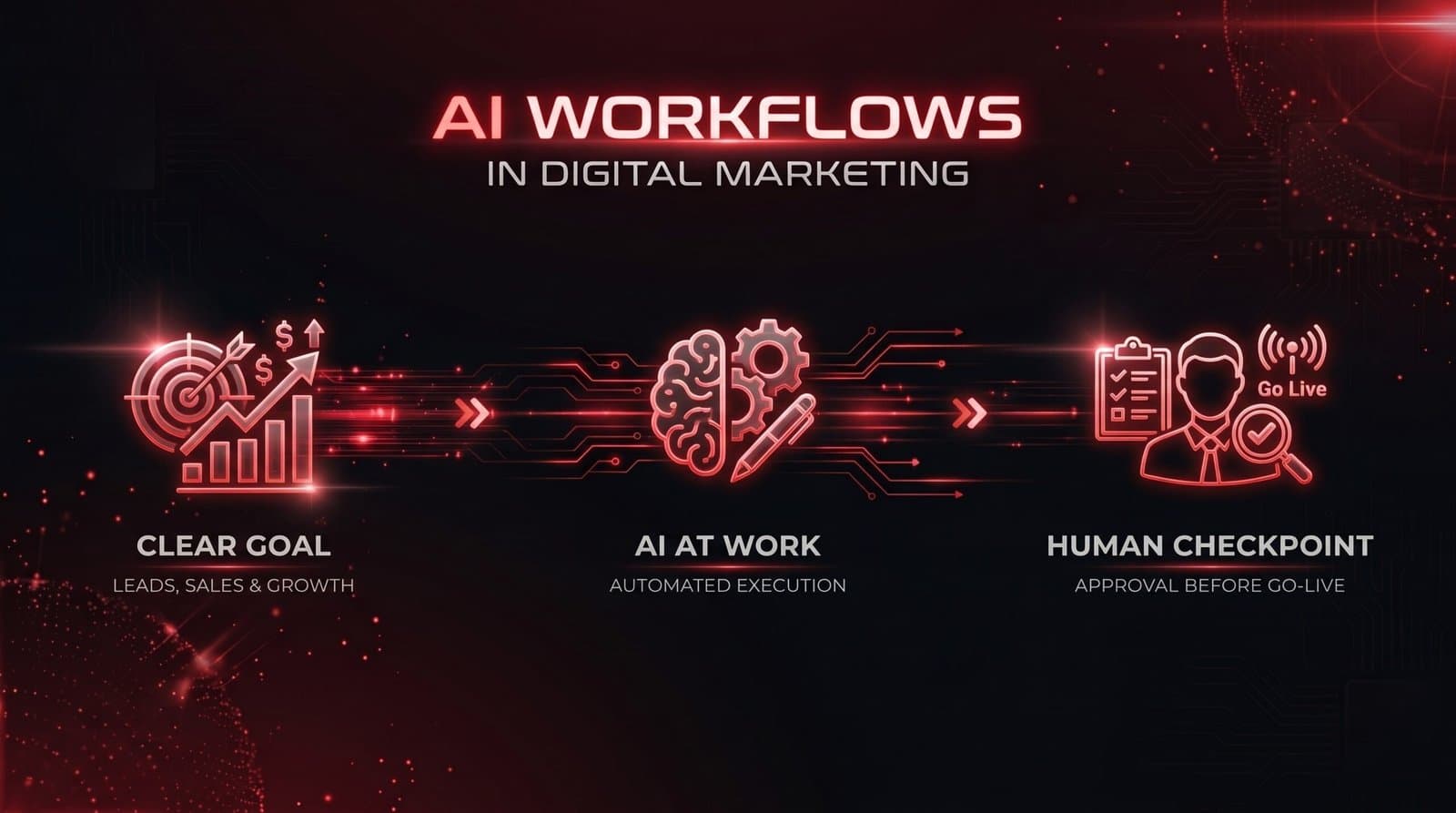
Good workflows share three traits:

  • A clear goal tied to leads, sales or growth
  • A defined step where AI does the work
  • A human checkpoint before anything goes live

Graphic depicting AI workflows in digital marketing.

Partner with Raven & Macaw to revolutionise your marketing campaigns!

Step 1: Audit Your Current Campaign Process

Before adding AI, map out how your campaign currently runs. List every task from research to reporting, and sort each one into one of these groups:

  • Repetitive and time-consuming (reporting, tagging, scheduling): high AI suitability.
  • Creative first drafts (ad copy, email drafts, captions): high suitability, with human editing.
  • Strategy and positioning (offer design, brand voice): low suitability, keep human-led.
  • Relationship and trust work (client calls, negotiations): low suitability, keep human-led.

This tells you where AI saves the most time with the least risk.

Graphic depicting how to stop wasting budget on generic AI content

Related Read: Google Business Profile Checklist; Things You Need To Check Before Launch Day

Step 2: Build an AI Content Creation Workflow

An AI content creation workflow should produce drafts quickly while protecting quality. A simple version looks like this:

  1. Research: Use AI to summarise audience questions, competitor angles and trending topics.
  2. Brief: Write a clear brief with your audience, goal, tone and keywords.
  3. Draft: Let AI produce a first version of the blog, ad copy or email.
  4. Edit: A human adds local context, real examples, facts and brand voice.
  5. Optimise: Check keywords, headlines and calls to action.
  6. Publish and measure: Track performance and feed the lessons back into the next brief.

Your brief is the most important part. Vague prompts give vague results. Include who the reader is, what you want them to do and the tone you want.

Step 3: Use AI Marketing Automation for Lead Follow-Up

AI marketing automation works best after the lead arrives. Many businesses spend heavily on ads, then lose leads through slow replies.

You can automate:

  • Instant replies to new enquiries on WhatsApp, email or Instagram
  • Lead scoring, so your team calls the hottest prospects first
  • Follow-up sequences for people who did not buy
  • Appointment reminders and payment nudges

Keep messages personal and in a tone your customers recognise. Over-automated, robotic messages damage trust, especially in a market where people value personal relationships.

Step 4: Choose AI Tools for Nigerian Marketers Wisely

There are many AI tools for Nigerian marketers, and new ones appear every week. Choose based on need, not hype. Before paying for any tool, ask:

  • Does it solve a specific problem in my workflow?
  • Does it work well with my current tools, such as my CRM, WhatsApp and ad platforms?
  • Is the pricing sustainable, considering dollar-based subscriptions and naira exchange rates?
  • Does it handle customer data responsibly? Keep Nigeria’s data protection rules in mind when feeding in customer information.

Related Read: Rank higher on Google With These Simple On-Page Optimization Steps

Start with one or two tools, master them, then expand.

Graphic depicting how to supercharge your marketing campaigns with AI

Step 5: Apply Digital Marketing Campaign Automation to Reporting and Optimisation

Digital marketing campaign automation can save hours each week on reporting. AI can help you:

  • Pull data from ads, website and social platforms into one summary
  • Flag unusual changes, such as a sudden cost spike
  • Suggest A/B tests for headlines, audiences and creatives
  • Turn raw numbers into plain-language insights for clients

Always verify the numbers and the recommendations. AI can misread data, and you remain accountable for decisions.

Common Mistakes to Avoid

  • Publishing AI output unedited. It often sounds generic and may contain errors.
  • Ignoring the local context. Content should reflect Nigerian customers, places and buying habits.
  • Automating everything at once. Roll out one workflow at a time.
  • Measuring tool usage instead of results. Track leads, sales and cost per acquisition.
  • Skipping team training. Your team needs to know how to prompt, review and improve outputs.

Related Read: 4 Tips To Help Your Business Generate More Clients Via Social Media

Graphic depicting common mistakes to avoid in your AI workflows.

A Simple 30-Day Adoption Plan

  • Week 1: Audit your process and pick one task to improve.
  • Week 2: Build a simple workflow with a clear brief and review step.
  • Week 3: Test it on a live campaign and record time saved and quality.
  • Week 4: Review results, refine and add a second workflow.

Partner With Raven & Macaw To Improve Your Campaigns

AI workflows in digital marketing reward businesses that stay strategic. Use AI to remove repetitive work, then spend the saved time on what machines cannot do. At Raven & Macaw, we understand that the marketing landscape is evolving and you need to understand your customers better, with an emphasis on trust. We can help you on this journey by building AI workflows for your digital marketing campaign to boost efficiency and conversion rates.

Want help building an AI-powered campaign that is grounded in the Nigerian market? Contact our team today for a strategy session to figure out the first steps of your AI-powered campaign. .


Published on Nov 9, 2026
By Raven & Macaw Team
Category: Digital marketing
Share this post:

Enjoyed this post?

Get more insights delivered to your inbox. Subscribe to our newsletter for the latest updates.

Browse More Posts

Related Posts

Continue reading with these related insights and articles

Why Your Meta Ads Might Not Be Converting: 5 Reasons And How To Tackle Them
Digital marketing
Nov 9, 2026
7 min read

Why Your Meta Ads Might Not Be Converting: 5 Reasons And How To Tackle Them

If your Meta ads are not converting, you are not alone. Many Nigerian business owners spend real money on Facebook and Instagram ads and get plenty of likes, comments and clicks, but few enquiries or sales. Likes do not pay your rent. Leads and revenue do. The good news is that most conversion problems come from a handful of fixable mistakes. Below are the five most common ones, and what to do about each. Quick Diagnosis Before you dig in, match your symptom to the likely cause: Lots of clicks, no sales: weak landing page or wrong audience. Match the ad promise to the page. Lots of impressions, few clicks: weak creative or hook. Test new visuals and opening lines. Leads, but no one replies: poor lead quality or slow follow-up. Add qualifying questions and reply fast. Results fluctuate wildly: tracking or budget problems. Fix the Pixel and stabilise the budget. Related Read: 5 Steps To Set Up An Effective Meta Ads Campaign 1. Your Meta Pixel Tracking Is Broken or Missing If Meta cannot see what happens after the click, it cannot learn who your buyers are. Without proper Meta Pixel tracking, the algorithm optimises blindly, and you cannot tell which ads actually work. How to tackle it: Install the Meta Pixel and Conversions API on your website. Set up the events that matter: Lead, Purchase, Add to Cart, or WhatsApp click. Use Meta’s Events Manager to confirm the events fire correctly. If you sell through WhatsApp, track those clicks as conversions rather than just counting link clicks. 2. Your Facebook Ads Landing Page Does Not Match the Ad A common leak is sending paid traffic to a slow, confusing page. If your ad promises “Free consultation in Abuja” and the page opens on a generic homepage, people leave. Many Nigerians browse on mobile data, so a heavy, slow-loading page loses visitors before they see your offer. How to tackle it: Send each ad to a dedicated page with one clear offer and one call to action. Keep the headline consistent with the ad. Compress images and test your mobile load speed. Make it easy to contact you: a WhatsApp button, a short form, and a visible phone number. Show trust signals such as your CAC registration, real customer reviews and a physical address. Related Read: How To Generate Leads Using Landing Pages & Facebook Ads 3. You Are Targeting the Wrong Audience Broad or poorly defined targeting wastes budget. Showing your ad to everyone in Nigeria when you serve only Abuja and Lagos clients is a quiet way to burn cash. How to tackle it: Define your ideal customer: location, income level, job type and buying intent. Use custom audiences from your existing customers, website visitors and people who engaged with your page. Build lookalike audiences from your best customers. Exclude people who have already bought, and exclude irrelevant locations. Test audiences one at a time so you know what is working. Book a strategy session with Raven & Macaw today and experience improved conversions 4. Your Creative and Offer Are Not Compelling People scroll fast. If your first two seconds do not stop the scroll, the rest of your ad never gets seen. Generic stock photos and vague offers like “Best quality, affordable prices” blend into the feed. How to tackle it: Lead with the customer’s problem, then present your solution. Use real photos and short videos of your product, team or results. Write copy the way your customers speak. A little local flavour builds trust. Make the offer specific: a price, a bonus, a deadline, or a guarantee. Test at least three creatives at a time and retire the losers quickly. Get your free SEO and website growth audit at Raven & Macaw today! 5. Your Instagram Ads Lead Generation Process Has Gaps After the Click Sometimes the ad works, but the business loses the lead afterwards. Leads that wait hours for a reply go cold. Lead forms that ask too few questions bring in time-wasters, and forms that ask too many scare people off. How to tackle it: Reply to new leads within minutes, ideally with WhatsApp automation or a saved response. Add one or two qualifying questions, such as budget or timeline. Follow up with people who didn’t respond using retargeting ads and messages. Track your cost per lead and your cost per sale, not just clicks. Getting Your Meta Ads Budget Right Your Meta ads budget should reflect your goal and your margins. Spreading a tiny budget across many campaigns starves each one of data. Instead: Start with one objective, such as leads or sales. Give each ad set enough budget to collect meaningful results before judging it. Avoid changing the budget or pausing ads every day, since this resets learning. Increase spend gradually on what works, rather than doubling overnight. Account for naira fluctuations and payment setups, since a card that declines mid-campaign can pause your ads.   Transform Your Meta Ads With Raven & Macaw  When your Meta ads are not converting, the fix is rarely “spend more.” Start by checking your tracking, then your landing page, audience, creative and follow-up process, in that order. Fix one thing at a time, measure the result, and if you need experts to handle your Meta ads campaign, Raven & Macaw is your best bet.  At Raven & Macaw, we offer efficient digital marketing services for B2B and B2C brands and businesses, with a team of paid ads specialists always available to work on your digital marketing campaigns so your Meta ads reach your target audience and drive high conversion rates.  If you would like a professional review of your campaigns, our team can audit your account and show you exactly where your budget is leaking. Contact us today to book your Meta ads audit.  

By Raven & Macaw Team
READ
Google Business Profile Checklist: Things You Need To Check Before Launch Day
Business
Oct 29, 2026
9 min read

Google Business Profile Checklist: Things You Need To Check Before Launch Day

Launching a business in Nigeria without optimising your local search presence is like opening a grand commercial centre and forgetting to put up a signboard. Costumers in Nigeria do not wander through city streets to discover products or services, they search directly on Google Maps and Google Search. If your business profile fails to appear when nearby customers search for what you offer, you lose revenue directly to verified competitors before your first day of operation. Achieving top local search rankings requires structured Google Business Profile optimisation long before your official launch date. Far beyond filling out basic contact details, launching a profile demands a rigorous pre-launch audit to ensure your company claims its prime position in the local Map Pack across major commercial hubs like Lagos, Abuja, Port Harcourt, Kano, and Ibadan. The Launch Day Setup Checklist: 10 Critical Checks Before clicking the publish button or announcing your opening date, verify every item on this pre-launch checklist to maximise reach and avoid instant rejections: Verify Official Business Name Accordance: Use your exact registered business name without adding keyword-stuffed terms (e.g., use “Raven & Macaw” rather than “Raven & Macaw Best Digital Agency Abuja”). Extra descriptors violate Google’s guidelines and trigger profile suspensions. Audit Core Address Details: Format your physical address accurately down to the suite, floor, and building number. Whether located in Central Business District, Jabi, or Gwarinpa, your address formatting must match your official business registration documents. Map Service Areas Accurately: If you deliver products or provide on-site services across Abuja (e.g., Asokoro, Lokogoma, Utako), explicitly list these districts as service areas to expand your reach in local map searches. Select Primary and Secondary Business Categories: Select the single primary category that most specifically describes your core business. Add relevant secondary categories to help Google categorise all your supporting services accurately. Set Exact Business Hours and Holiday Schedule: Configure your regular operating hours accurately, including weekend schedules. Add upcoming special holiday hours in advance so clients never arrive at closed doors. Integrate Primary Local Phone Numbers: Provide a direct, reachable phone line (preferably with a local area code or standard direct line) that can directly receive calls or verification SMS text messages. Connect Your Canonical Website URL: Link directly to your primary website landing page rather than a generic social media profile. Ensure your website features a matching footer address and fast mobile load times. Upload High-Resolution Exterior and Interior Photos: Upload crisp, well-lit photos showing exterior signage, reception areas, equipment, and staff. Real photography builds significantly more trust than generic stock imagery. Draft a High-Converting Profile Description: Write a clear, 750-character business summary. Front-load the first 250 characters with your core services, unique value proposition, and primary location. Enable Messaging and Booking Integrations: Turn on direct messaging within your profile dashboard and connect booking links so hot leads can interact with your business instantly. Local Business Listing Abuja: Dominating the FCT Map Pack Optimizing a local business listing Abuja demands a localized strategy tailored to the region’s unique geography and commercial habits. Consumer behavior across the FCT differs significantly from other commercial hubs, making precise target optimization essential. Focus on these three essential pillars to dominate local map searches: Geographic Relevance: Clearly specify the exact districts you serve. A corporate advisory firm in CBD needs different localized landing pages than a retail shop operating out of Utako or a restaurant in Wuse 2. On-Site Location Signal Alignment: Embed a Google Map pointing to your verified profile directly on your website’s contact page. This reinforces your geographical coordinates in Google’s indexing system. Local Directory Citation Building: List your business on established Nigerian directories (such as VConnect and BusinessList Nigeria) using the exact same address, phone number, and name details. NAP Consistency: The Foundation of Local Search Trust A primary cause of low local search rankings and unexpected profile suspensions is a lack of NAP consistency (Name, Address, Phone Number). Search engine algorithms cross-reference information across the web to verify whether your business is authentic and active. When your profile displays one address format while your website, social channels, or CAC registration show a different version, Google’s trust score drops. Ensure every single digital footprint uses the exact same character-for-character address structure.  Google Business Profile Categories: Choosing for Maximum Reach Selecting appropriate Google Business Profile categories directly determines which customer searches will display your listing. Your primary category carries the heaviest weight in Google’s ranking algorithm. Follow these proven strategic principles when picking categories: Prioritise Specificity Over Generality: If you operate a dental clinic specializing in teeth whitening, choosing “Teeth Whitening Service” or “Dental Clinic” yields far better targeted results than simply selecting “Medical Center.” Utilise Supporting Secondary Categories: Add 2 to 5 secondary categories to capture related service queries without diluting your primary focus. Monitor Seasonal Category Shifts: If your business offers seasonal services, review and adjust secondary categories periodically to align with shifting local demand. Google My Business Nigeria: Verification and Launch Best Practices Setting up a Google My Business Nigeria profile requires preparing for verification hurdles unique to the local ecosystem. In past years, Nigerian business owners relied almost entirely on mailed postal codes that often got lost in transit. Today, Google relies primarily on video verification as the default verification method. To pass video verification on your first attempt, prepare a continuous, unedited video recording showing: Exterior Signs and Street Context: Capture nearby street signs, exterior building numbers, and permanent outdoor company signage. Interior Workspace Evidence: Show your operational area, reception desk, branded equipment, or inventory shelves. Proof of Management Rights: Film yourself unlocking the entrance door, logging into official point-of-sale software, or displaying official business registration documents (such as CAC certificates). How to Get More Google Reviews in Nigeria Learning how to get more Google reviews in Nigeria is essential to maintain top map rankings and win over prospective clients after launch. Positive reviews build social proof faster than any paid ad campaign. Implement these actionable review acquisition methods from day one: Generate

By Raven & Macaw Team
READ